Tool actions
This section describes the tool actions available from the Tool action program node. The tool actions are used to control the tool in runtime.
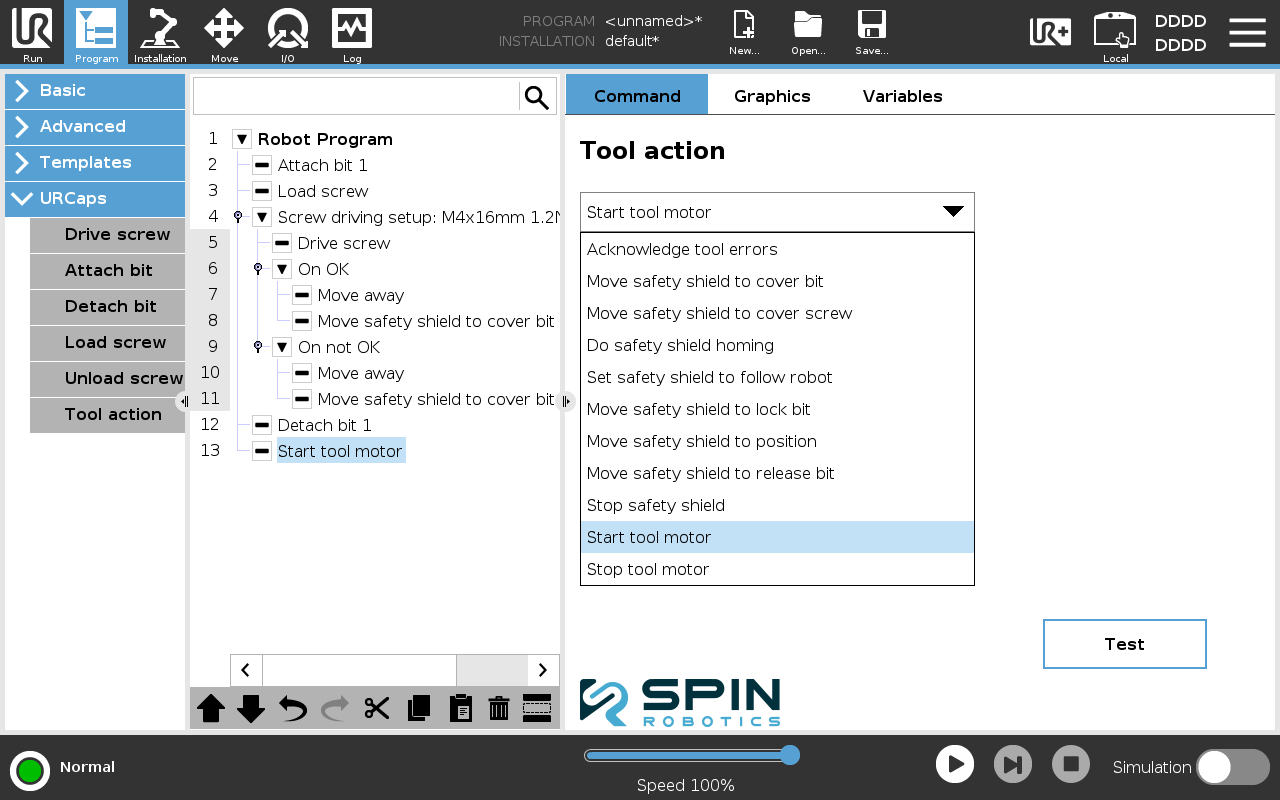
Tool actions
From Program/URCaps select a Tool action program node.
Select the tool action from the drop-down list.
Enter necessary parameters.
Note
The tool actions that move the safety shield all have a checkbox called Blocking. If this checkbox is checked, the tool action will block the program execution until the safety shield has reached the desired position. If the checkbox is not checked, the tool action will not block the program execution.
Acknowledge tool errors
This tool action acknowledges tool errors. Note that not all tool errors can be acknowledged.
Move safety shield to cover bit.
This tool action moves the safety shield to cover the bit.
Move safety shield to cover screw.
This tool action moves the safety shield to cover the screw. The length of the screw must be specified.
Do safety shield homing
This tool action performs homing of the safety shield.
Set safety shield to follow robot
This tool action sets the safety shield to follow the robot. The safety shield will try to follow the robot when the robot is moved in the direction of the screw driving axis. E.g. if the tool moves down, the safety shield moves up. The tool action must be stopped again by calling the Stop safety shield tool action.
Move safety shield to lock bit
This tool action moves the safety shield to the lock bit position.
Move safety shield to release bit
This tool action moves the safety shield to the release bit position.
Stop safety shield
This tool action stops the safety shield from moving.
Start tool motor
This tool action starts the tool motor. The motor speed must be specified. The tool action must be stopped again by calling the Stop tool motor tool action.
Stop tool motor
This tool action stops the tool motor.