Adding Traceability
Traceability means linking each screwdriving result to the product or joint it belongs to — for example a serial number, a batch number, or a joint identifier. This makes it possible to retrieve the exact measured torque, angle, and pass/fail status for any fastener in a finished product.
Results are published over OPC UA every time a joining operation completes. Each result automatically includes the tool identity and the program that was executed. The robot program is responsible for attaching any additional application-specific identifiers before the screw is driven.
How it works
Two URScript functions are provided for attaching identifiers to results:
spin_append_entity(entityId, entityType, name="", description="", entityOriginId="")Attaches one identifier to the next result. Call this once for each piece of identifying information you want to record. The arguments are:
entityId (required) – the identifier value, e.g. a serial number string or URI.
entityType (required) – an integer code describing what the identifier represents. Common codes:
10= joint identifier,21= part/serial number,27= joining process.name (optional) – a short human-readable label, e.g.
"serial number"or"joint id".description (optional) – free-text context, e.g.
"Body panel assembly".entityOriginId (optional) – identifier of the external system that assigned the
entityId, e.g."MES-LINE-3".
See IJT Base spec §10.10 Table 226 for the full
EntityDataTypedefinition, including all entity type codes.spin_clear_entities()Removes all previously appended entities. Because the entity list is sent from the robot when the Drive screw node starts, it is safe to clear the list immediately after the node — the result is not affected.
Important
Entities must be appended before the Drive screw node executes. The list is sent from the robot when the node starts, so any calls to spin_append_entity after that point will not be included in the result.
Warning
The entity list has a fixed capacity of 10. Appending more than 10 entities will cause an error.
Programming example
The example below attaches a product serial number to each screwdriving result. The serial number is read into var_1 before the screw program runs — in practice this would come from a barcode scanner, a PLC signal, or an upstream assignment node.
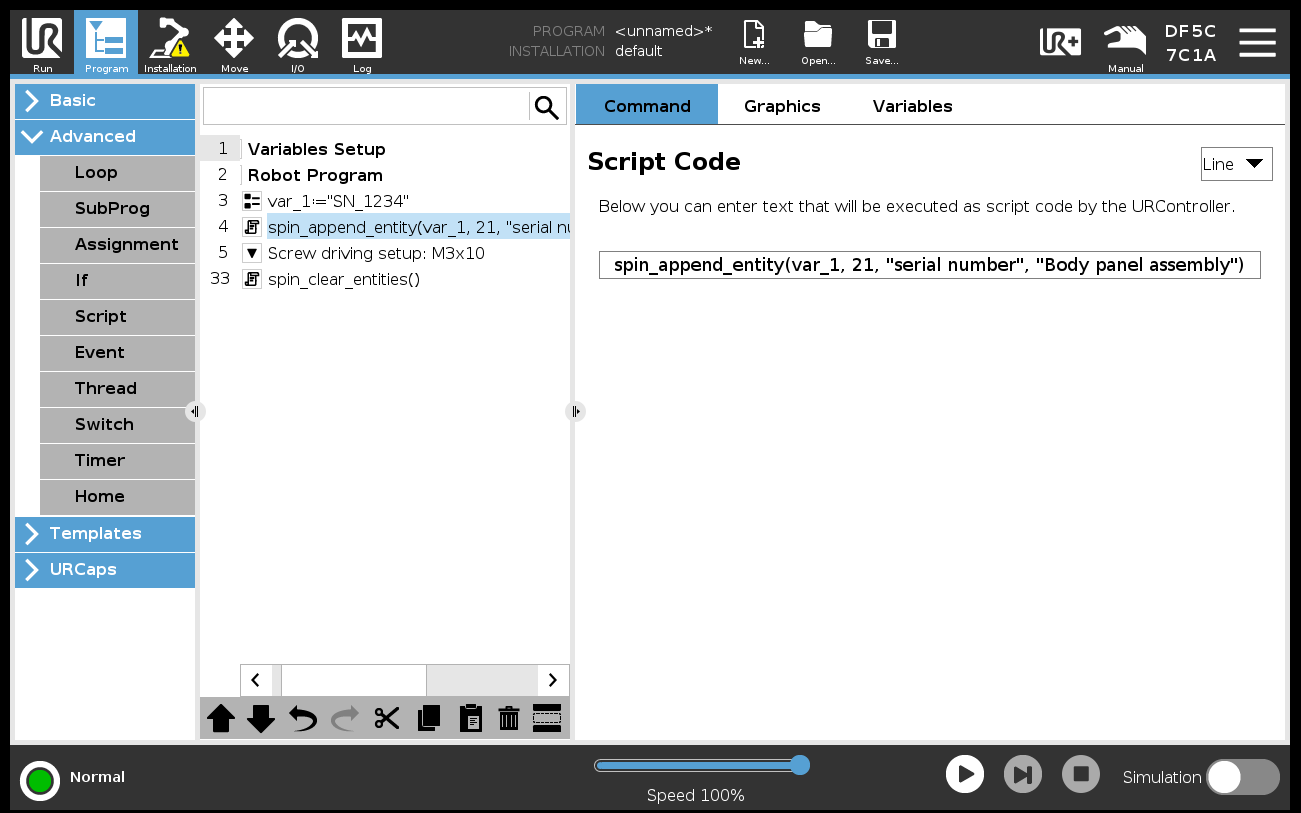
Script node calling spin_append_entity before a Drive screw node.
A Script node placed before the Drive screw node calls spin_append_entity. A second Script node placed after the Drive screw node calls spin_clear_entities to reset for the next cycle.
Multiple entities can be attached by calling spin_append_entity several times in the same Script node — for example to record both a serial number and a joint identifier for the same operation.
Accessing results
The attached entities are embedded in every result published by the OPC UA server. A consumer subscribed to the ResultManagement node receives a single event containing the full result — measured torque, angle, insertion depth, pass/fail evaluation, process curve data, and all associated entities — with no secondary lookup required.
See the Spin OPC UA Server documentation for details on the result structure and how to subscribe to result events.